
Devzapp is a CRM and communication system that helps organize and manage the sales team's activities from prospecting to deal closing, where you can send automated messages via WhatsApp and Telegram to your customers.
The integration between Guru and Devzapp helps you to:
-
Send sales data to the Devzapp platform; and
-
Create a communication campaign for messaging tools.
The integration between Guru and Devzapp is done via webhooks. If you have reached the available webhook limit, simply upgrade your plan to the Plus 2 or Plus 3 category.
To activate the integration with Devzapp you must perform the following 2 steps.
On this page:
-
Step 1: Get Return URL
-
Step 2: Configure Webhook
-
Devzapp Communication Channels
Step 1: Get Return URL
In this step, you must access your Devzapp account to get the Webhook URL.
Steps:
1 - Access your Devzapp environment with your username and password.
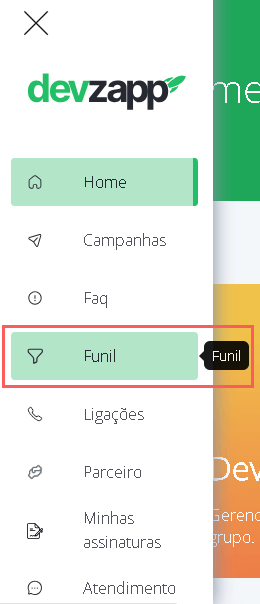
2 - In the left side menu, click on Funnel.
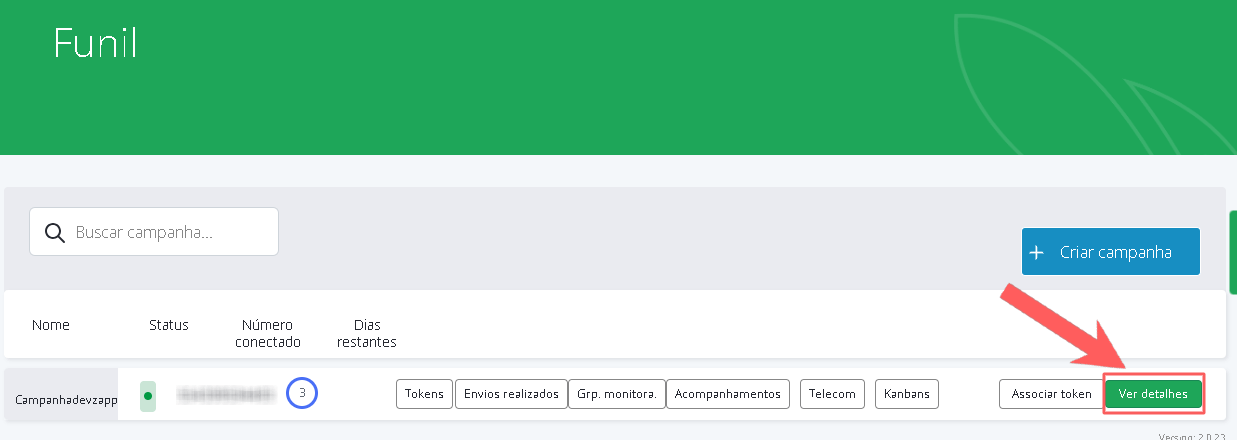
3 - Select the desired campaign, and click on View details.
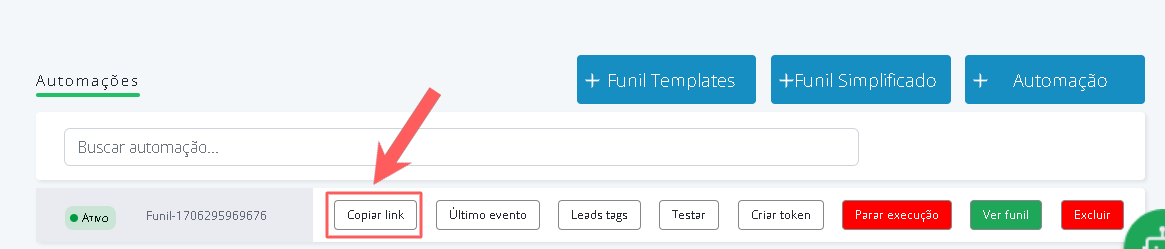
4 - Next, click on Copy link (Webhook URL).
Step 2: Configure Webhook
In this step, you must access your Guru account (Settings » Webhooks) and configure an e-ticket, sales, or subscription webhook to send notifications to Devzapp. You can later configure the communication campaign associated with the desired sales funnel.
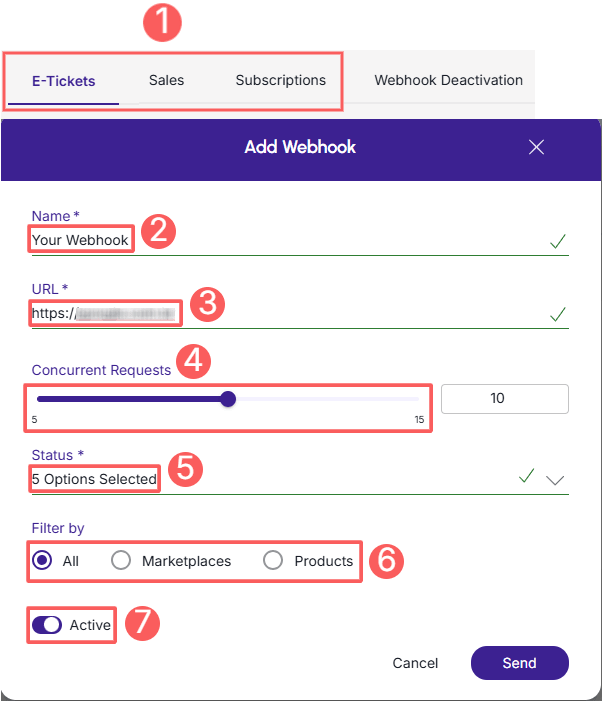
When creating the Webhook, remember to:
-
Select: if the webhook is for subscriptions, select the subscription status; if the webhook is for e-tickets, select the e-tickets status; if the webhook is for sales, select the sales status;
-
Name: enter the name of your Webhook;
-
URL: Webhook URL, obtained from step 1 - item 4;
-
Simultaneous sendings: select simultaneous sendings;
-
Status: select all desired sales statuses; subscription statuses or e-ticket statuses;
-
Filter by: check filter by
all,MarketplacesorProducts(1); -
Toggle the Active button to the on position.
(1) By choosing to filter by “all” or “marketplaces”, any new product created will be automatically associated with the webhook.
See the full step-by-step guide:
How to configure a subscriptions, e-tickets or sales webhook.
Done! From this moment on, each updated sale that meets the criteria defined in the configured webhook will be sent to Devzapp.
Devzapp Communication Channels
DevZapp offers support for issues related to message automation, sales recovery, WhatsApp API connection, group management, and integrations with checkout platforms.
If you need technical or operational assistance directly from the platform, use the official channels below:
-
Support via WhatsApp: primary support takes place directly through the official number - via WhatsApp + 55 (47) 9 9114-5429;
-
Video and Resource Center: access the official channel on YouTube (@devzapp) to find tutorials, news, and step-by-step instructions on the tool's features.
Tip: For questions exclusively related to settings in the Guru panel or checkout operation, please contact our support team.