
You can customize the appearance of your ticket registration form. Although you can change the colors of most visual elements and text, we recommend choosing high-contrast color combinations to ensure your customers can read what is written. Remember to check the final result using the color editor's preview tool.
The ticket registration form customization is applied at the product level.
On this page:
-
Change form page colors
-
Other style and appearance options
Before you start, you need to…
-
Be an administrator user or have permission to perform the following actions.
Change form page colors
You can change the form colors to match your brand colors.
Steps:
1 - Access the desired ticket - a screen with the data will be displayed.
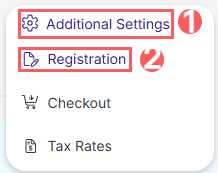
2 - Click on Additional Settings and then on Registration.
3 - Click on the Appearance tab.

4 - In Appearance, click the Configure E-ticket Colors button.

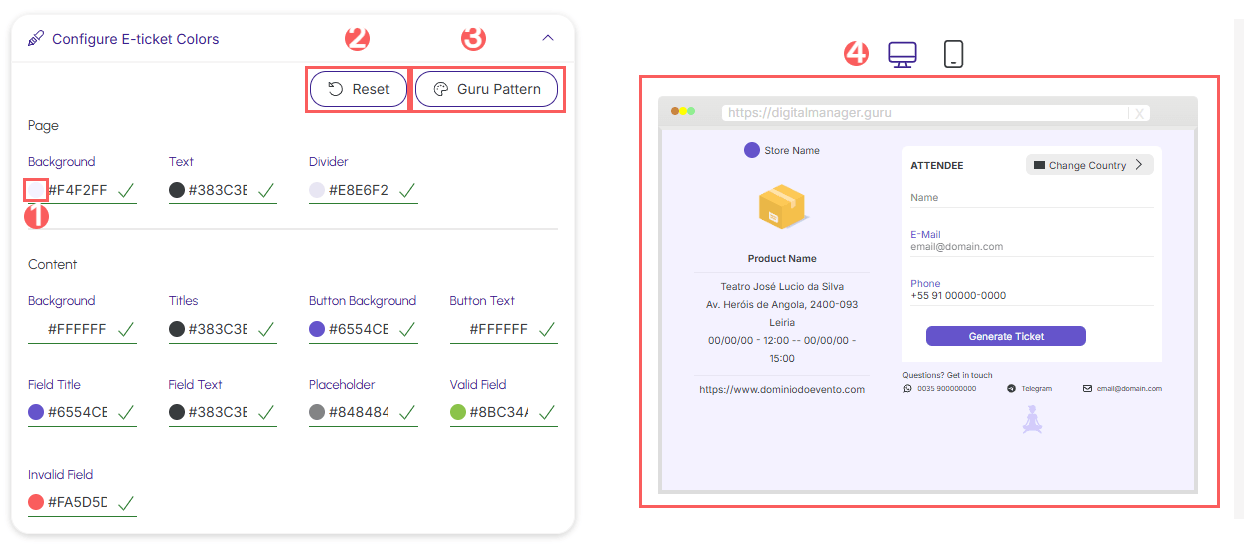
5 - In the editing window, use the control buttons or enter the color code in hexadecimal format for each E-ticket element. As you make changes, you can check the final result on the right side of the window.
-
Color picker: displays a color palette for selection - available for each form element;
-
Reset: undoes all changes made;
-
Guru Pattern: returns to Guru's default color scheme;
-
Preview: toggles the preview between desktop and mobile device.
6 - Once changes are complete, click Submit.
Other style and appearance options
You can also customize the form on mobile and highlight the image.
Steps:
1 - In Appearance, enable the following options:
-
Expand Header on mobile: when enabled, displays ticket details in expanded format on mobile devices;
-
Highlight the image on mobile: when enabled, displays the ticket image and description at the top for mobile devices.

.jpg?cb=8837a4ea6a4e7db37d2e094edac9e7bf)
2 - Click Send.
More resources