
If necessary, you can force the sending of e-ticket data to integrated tools and active webhooks. This feature is useful when a tool has not received e-ticket data or it needs to be reprocessed.
E-ticket data is automatically sent to previously integrated tools, provided the sending conditions are met.
On this page:
-
Resend E-ticket data
Before you start, you need to…
-
Be an administrator user or have permission to perform the following actions.
-
Have one or more registered tickets in Guru.
Resend E-ticket data
You can resend data to autoresponder tools and e-ticket webhooks.
Steps:
1 - Select the desired ticket - a screen with the data will be displayed.
2 - On the Detail tab, click Resend.

3 - In the displayed window, activate the desired options:
-
Select All: when active, resends* the e-tickets to all active tools in the listed categories;
-
Autoresponders: when active, resends* the e-tickets to the integrated autoresponder platform(s);
-
Webhooks: when active, resends* the e-tickets to the associated webhook(s).
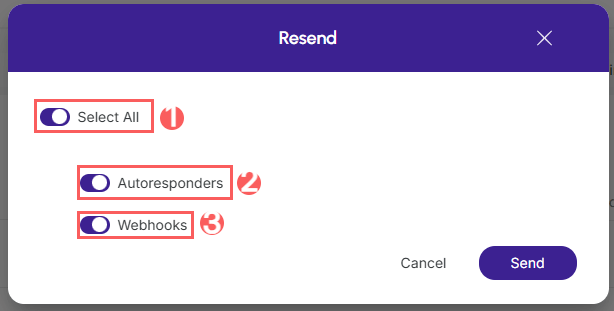
.jpg?cb=8837a4ea6a4e7db37d2e094edac9e7bf)
4 - Click Send.