
Find answers to frequently asked questions and problems related to Subaccounts.
On this page:
-
Credit Distribution
-
Account Linking
-
Resource Centralization
Credit Distribution
In this section, you will find answers to questions related to the distribution of subaccount credits in Guru.
- How are credits divided among subaccounts (parent account and child accounts)?
The credits of the parent account and subaccounts (child accounts) are dynamically shared by all linked subaccounts.
The parent account has a certain number of credits and can have associated subaccounts, according to the contracted plan. The parent account's credits are shared and are available for use by any of the subaccounts, without restriction or individual quota, meaning all subaccounts consume from the same global balance of parent account credits.
When the parent account's credits run out, access or use of resources ends for all subaccounts, and all return to the trial plan.
- Is there an order of consumption? For example, are credits always consumed first by the main account, or is consumption divided proportionally, or prioritized among subaccounts?
No, there is no order of credit consumption. The main account's credits are shared among all subaccounts, regardless of the number of subaccounts the main account has.
The main account must analyze its total processing and subscribe to a plan that covers the credit consumption of the subaccounts (child accounts).
If you wish to unify your accounts, consult the FAQ to check which plan applies.
Account Linking
In this section, you will find answers to questions related to linking subaccounts in Guru.
- If I have more than one active account, is it possible to link all of them to the parent account?
Yes, it is possible. You can add as many subaccounts (child accounts) as you want (there are no limits to adding subaccounts) and you can manage them through your main account.
Remember that the main account and subaccounts share the same credits. Thus, the more subaccounts, the more credits will be used, which will imply a larger plan for the parent account.
To add an existing account and turn it into a subaccount, it must be on the trial plan.
If you process subscriptions linked to a subaccount, contact the support or relationship team to start the procedure.
- Which plan do I need to use if I am going to unify all accounts?
If you wish to unify all existing accounts, you will need to check your monthly sales processing, as the main account's credits will be divided among the subaccounts.
How it works in practice
-
If you have, for example, an apprentice plan with 600 credits, these will be divided between the two accounts - that is, it is a single plan for both accounts, but each maintains the operational limit of the Apprentice;
-
If you happen to process 1000 sales per month, the Apprentice plan would not be enough to process the total for both accounts. In this case, you would place the main account, for example, on the disciple plan.
In this scenario, you should analyze your total processing volume (the number of credits or sales processed by your main account, including child accounts).
The definition of the plan (e.g., Apprentice, Disciple, etc.) must be made based on this processing, as the main plan's credits will be shared and consumed by all linked accounts.
You can track and consult the credits used within each subaccount.
- When unlinking a subaccount from the main account, will it automatically return to the Trial plan?
Yes. When unlinking a subaccount, it will return to the Trial plan, but will retain all configurations made while linked to the main account.
If the subaccount has active subscriptions or integrations, it is important to note that, upon returning to the trial, they may stop working or impact the operation.
- How to transform a subaccount into a parent account (Unlinking Process).
The process for a subaccount to become a parent account (i.e., become independent) involves unlinking from the main account (parent account), so that the unlinked subaccount can then contract an individual plan.
For this, you will need to:
-
Unlink the subaccount from the parent account: as the parent account administrator, you must access the Guru admin, the Settingsmenu, and then Subaccounts - select the subaccount you wish to unlink, and then click on the Unlink Subaccount option.
After unlinking, the subaccount automatically loses access to the parent account's plan and returns to the Trial Plan.
All subaccount data and configurations are maintained during this transition; however, if there are active subscriptions and/or integrations, they may stop working upon returning to the trial plan. In case of doubts, contact the support team via the platform's chat.
Once the subaccount is unlinked from the main account, the account can subscribe to the individual plan that best suits its business needs.
Consult the monthly and annual plans of Guru.
Resource Centralization
In this section, you will find answers to questions related to subaccount resources in Guru.
- Will the member area and invoice issuance be centralized in a single account (main account) for all subaccounts?
No, subaccounts will not be centralized for invoice issuance or member area in one place. The main account can manage all subaccounts, but each subaccount will operate individually.
Each subaccount has its own integrations, products, offers, etc., regardless of what is configured in the main account; only the credits are related to the main account (parent account).
In practice, how does management work?
When adding a subaccount, the main account administrator will be able to manage it, which includes observing all information such as the detail, remove a subaccount, access the activated integrations, track the consumption of credits used by each subaccount. In addition, it allows adding and updating users for each subaccount.
- Can subaccounts view information (such as details or usage) of the main account or other linked subaccounts?
No, subaccounts do not have access or visibility to information about other subaccounts or the main account (parent account).
Only the main account (parent account) can view and manage the subaccounts, in addition to tracking the individual consumption of credits for each subaccount.
When accessing the Credits Used by each subaccount, you will see:
-
Credits used for the last 28 days or 12 months;
-
Days of use (28 days) or months with use (12 months), and
-
Average per day (28 days) or average per month (12 months).
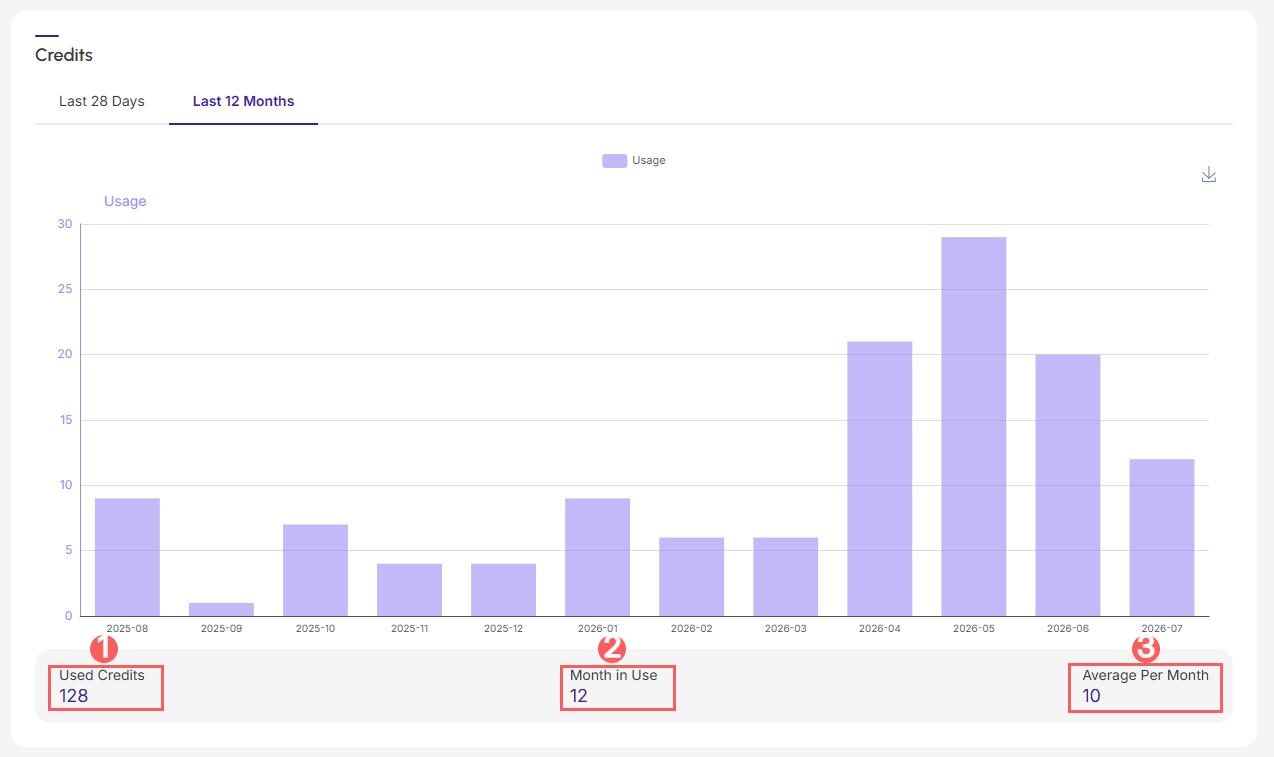
Access the detailed information of the subaccounts.
- Is it possible to define different permission levels (e.g., administrator) for users within each subaccount?
Yes, it is possible. You can personalize your subaccount, where you can access the Userssettings, and then Add User, and indicate whether it is an administrator, or if you will define specific accesses to certain functions for that user.
Access and learn how to create and update functions specific to each user.
- What functionalities of the parent account (e.g., integrations) are inherited by the subaccounts?
No information is inherited. The subaccount has autonomy to customize its configuration according to its needs, meaning it does not inherit any information from the main account (parent account).
What the subaccount can do:
-
Configuration: perform the complete account personalization;
-
Payment Integration: if you wish to integrate a payment processor, the user must access the subaccount, go to the Guru Checkout section and perform the integration with the desired processor;
-
Product/Offer Creation: create products/offers and associate them with the integrated payment processor; and
-
User Management: create users and define specific functions for them within the subaccount.
Configure as many subaccounts as you wish, and manage all of them in one place.
- Can the subaccount be registered under a different CNPJ than the main account's CNPJ?
Yes, the subaccount can have a different CNPJ from the main account's CNPJ. Although the main account manages credit usage and subaccounts, each subaccount operates independently regarding its fiscal and operational registration.
- Can the subaccount use a different payment processor than the one configured in the main account?
Yes, it is possible. Subaccounts have the autonomy to use a different payment processor than the one configured in the main account, and this flexibility allows each subaccount to integrate with the processor it desires.
The main account can manage and monitor which payment processors are integrated into each subaccount.
- Do all subaccounts use the same processor as the main account?
No. Each subaccount has full autonomy and can integrate with any payment processor of its preference.
- If the parent account has few sales or uses a near-zero amount of resources, what will be the impact?
If the parent account (main) does not use resources and/or does not make many sales, it can still manage the subaccounts. In other words, the parent account does not necessarily need to generate sales to maintain its administrative functions.
Access the detailed information of the subaccounts.
- How do the operational limits of subaccounts work?
Since the parent account (main) and subaccounts share the same plan, all limits refer to the parent account and are mirrored in the child account.
For example:
If you use the Apprentice Plus 2 plan, the operational limits defined for this plan are automatically inherited (shared) by the linked subaccounts; that is,
-
If the parent account has a limit of 10 advertisers, each subaccount will have a limit of 10 advertisers; and
-
If the parent account has a limit of 4 member areas, each subaccount will have a limit of 4 member areas, and so on.
The parent account (main) can manage subaccount information in the admin, with the following functionalities:
-
Viewing subaccount details,
-
Consulting the activated integrations in each of the subaccounts,
-
Tracking the credits used for the last 28 days and the last 12 months, and
-
User management such as adding, updating, and consulting subaccount information.
Access the detailed information of the subaccounts.