
At Guru, you can consult the account's payment history and the download link for the respective invoices (Portuguese tax invoice).
The Digital Manager Guru is a company in Portugal, so the tax document (invoice) is issued by the Portuguese tax authority with the data provided in the My Account » Details section.
On this Page:
-
Consult payment receipts (invoice)
Consult payment receipts (invoice)
In this section, you can consult the payment receipts for your Guru account.
Steps:
1 - Access guru's admin with your username and password.
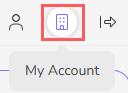
2 - In the upper right menu, click My Account.
3 - In My Account, click on Invoice.

4 - In Invoices all payments made are listed:
-
Status: payment status - Ex: approved;
-
Code: payment identification code;
-
Product: name of the contracted plan;
-
Data: date on which the payment was made;
-
Value: amount paid;
-
Payment method: icon corresponding to the method used.

5 - Click on the desired payment to view the invoice.