
You can view and change your Guru account registration data, such as contact details and address, and also access your API key.
The data provided in this section will be used to issue the invoice (payment receipt). Make sure all data is correct before signing up for a plan.
On this Page:
-
Manage account registration
Manage account registration
In the Details area, you can manage your Guru account registration.
Steps:
1 - Access the guru admin with your username and password.
2 - In the top right menu, click on My Account.
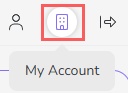
3 - In My Account, click on Detail.

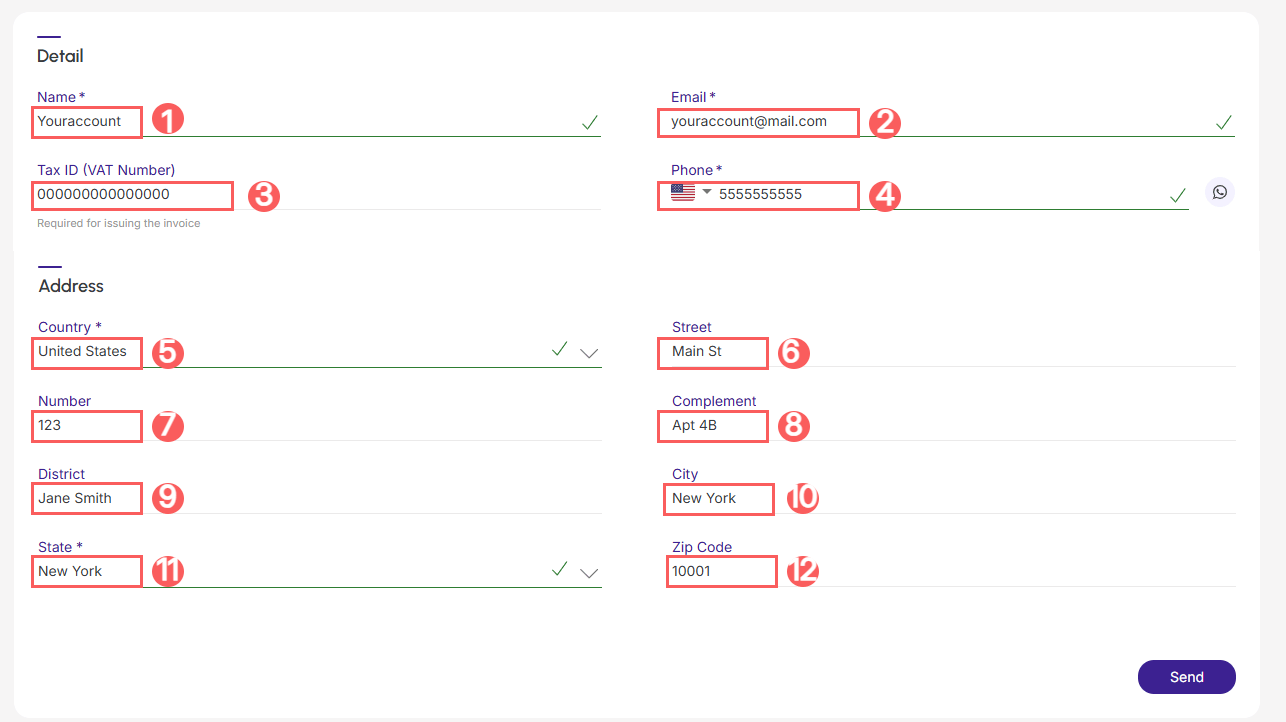
4 - In the Detail section, fill in the fields you want to update:
-
Name: enter the name of the account owner. Ex: your name or company name - the invoice (payment receipt) will be issued in this name;
-
Email1: enter the account registration email;
-
Tax ID (Vat Number): enter the tax identification number of the account owner. Ex: CNPJ, NIPC or Tax ID - the invoice (tax receipt) will be issued to this taxpayer;
-
Phone2: enter a valid mobile phone number for contact - if you wish, click on the icon and open the number directly in WhatsApp;
-
Country3: enter the country of tax residence of the account owner. Ex: Brazil or Portugal - the invoice (payment receipt) will be based on the country of tax residence;
-
Street: enter the name of the street where the account owner resides;
-
Number: enter the house, room, building number where the account owner resides;
-
Complement: enter the address complement, if any;
-
District: enter the neighborhood (parish) of residence;
-
City: enter the city of residence;
-
State: enter the state (district) of residence;
-
ZIP Code: enter the ZIP code (postal code) of residence.
(1) Invoices and important messages about the account will be sent to this email.
(2) You will be contacted by this number in case of emergencies or situations related to your account. Keep this number always updated!
(3) Incorrect country information may result in additional VAT charges.
5 - Click on Send.
Done! Your account data has been updated. The next invoices will be generated with the informed data and the next communications will be sent to the registered email and phone.