
Find answers to frequently asked questions and issues related to accounts and users.
On this page:
-
Trial Period
-
Account
-
Plans
-
Security
-
Users and Roles
Trial Period
In this section you will find answers to questions related to the trial period at Guru.
- How long is the trial period?
The trial period lasts 14 days, starting from the account creation date, during which you can make unlimited sales on the platform, and every credit consumed will be returned to the account.
To understand all details about the trial period duration, check the information about Free Trial - Guru.
- What operational limits do I have during the trial period?
During the trial period, you will be entitled to unlimited sales and the same operational limits as the Apprentice plan, except for the number of users, which will be limited to 1 active user.
- What happens to the account when the trial period ends?
The account retains a balance of 10 credits and, from this moment on, no used credits will be replenished. Subscription renewal charges are not processed and when the credit balance reaches zero, all account features stop working, including Checkout Guru.
- My trial period has ended, how do I subscribe to a plan?
To subscribe to a plan, simply access your Guru account with your login and password and click on “Subscribe to Plan” at the top left of the screen. Next, select the most suitable plan for your total number of monthly sales and follow the instructions for payment.
Note: only administrator users can subscribe to a plan.
An information bar will be displayed when the trial period ends, allowing you to subscribe to a plan.

Account
In this section you will find answers to questions related to your Guru account and monthly and annual plans.
- I created an account in Digital Manager Guru, now what?
You should perform the general settings for checkout and subscriptions, if you wish to sell subscriptions. Then you will need to set up basic integrations (payment and invoicing), and finally register products and offers. In the first steps you can access this information regarding the setup of your Guru account.
- My account stopped working! What should I do?
If your account stopped processing payments in Checkout Guru, performing integrations, or processing subscription renewals, there may have been an integration failure, insufficient credit balance, or your trial period may have ended. Check if there are any notifications (bell icon in the top corner) and follow the instructions to solve the problem, or check your credit balance under My Account > Subscription.
- How can I track my credit consumption?
To check credit usage, simply access Your Account > Credits. In this section, a chart displaying daily consumption over the last 28 days, average daily usage, total credits used in the period, and current balance is available.
- How do I change my registered email?
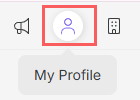
Access your account with your login and password and in the top right menu, click on My Profile.
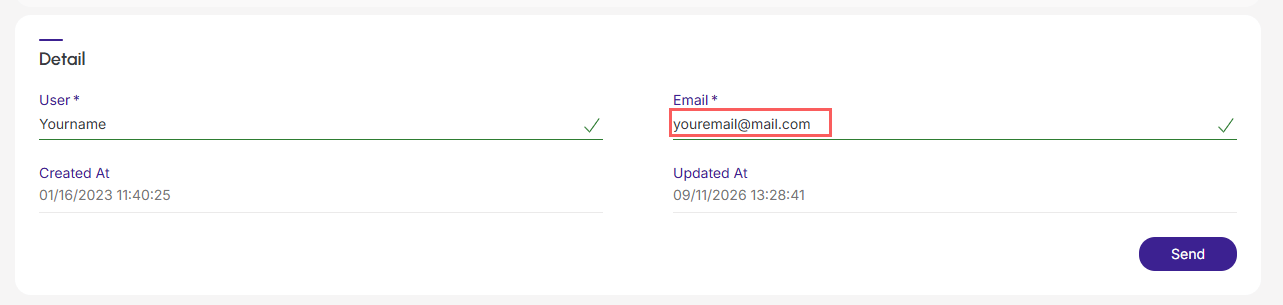
Under the Details tab, enter your email details and click Send.
Plans
In this section you will find answers to questions related to monthly and annual plans.
- How do annual plans work?
The Annual Plan corresponds to 12 consecutive months of use, taking effect from the moment of subscription, allowing you to organize everything according to your business calendar.
With the annual plan, you guarantee 12 months of access for the price of 10, paid annually, offering greater advantage and a discount.
For guru's annual plans, charging is made for the total value of the plan and occurs once a year.
It is important to note that, although the amount corresponds to a 12-month period, the payment is annual, not monthly. If a renewal occurs, the amount will be proportional to the remaining period, but the payment cycle remains annual. This means you will not have monthly invoices, only one charge every 12 months.
How it works
When subscribing to an annual plan like "Apprentice", you immediately have all credits corresponding to 12 months available. For example, if the Apprentice plan offers 600 monthly credits, in the annual plan you will have 7200 credits (600 x 12) available for use from the beginning of the period.
Your current usage structure remains exactly the same, but with the great advantage of two compensatory months, guaranteeing an even higher return for you.
- How are credits deducted?
Each Guru credit corresponds to one sale recorded on the platform, regardless of payment status, meaning each processed sale - whether sales approved, canceled, abandoned, recurring - counts as 1 credit.
As soon as the sale is recorded in Guru, 1 (one) credit is deducted; this means that the deduction of one credit occurs for each sale, regardless of its status. That is, whether sales are approved, canceled, abandoned, or recurrences (renewals), each record equals the consumption of 1 (one) credit from your limit.
To check credits, simply access My Account » Credits or if you prefer access and check credits for your Guru account.
- Do billing retries for a subscription consume credits from my balance?
Yes, retries consume credits. This is because, in Guru, each payment or collection attempt is processed as a new transaction in the system.
Consumption works as follows:
-
Transaction per Credit: each new attempt to process a payment is treated as an individual transaction; and
-
Balance Consumption: 1 credit will be deducted, which equals 1 (one) sale recorded on the platform (regardless of payment status), where the system deducts one credit for each retry aiming to recover the subscription, meaning each retry is a new transaction.
Note: Check your dunning schedule. settings.
Adjusting the number of automatic retries is essential to balance your recovery rate and avoid unexpected credit consumption.
- What happens when my account runs out of credits?
If credits run out, Checkout Guru links immediately stop working, preventing the buyer from accessing them. In addition, subscription renewal charges cannot be processed, sales from external checkouts cannot be received, and data from integrated platforms cannot be sent. Active RPPCs stop storing leads or conversion statistics.
For account resources to be restored, you will need to upgrade your plan.
- Will I be notified when account credits are exhausted or about to run out?
Yes, credit information will be displayed when monthly usage exceeds 80%. And we send a notification email about credits about to run out once a day, early in the morning, if our estimate detects that the remaining Days is equal to or less than 5 days1.
Attention: if you run meteoric launches with Checkout Guru, we recommend calculating expected sales and verifying whether you have sufficient credit balance before opening the cart to avoid sales interruption. If you are unsure of the required credit volume, consider upgrading your plan before launching.
1If you made a launch the previous day, the warning for credits about to run out may not accurately reflect the number of Remaining Days due to the recent usage spike.
Credit information for your plan will be displayed when monthly usage exceeds 80%.

- Account credits are exhausted, what should I do?
You should upgrade your plan. If you are in the base category, you can switch to the Plus 1 or Plus 3 category, or upgrade to the next plan.
Before upgrading, we recommend estimating the amount of credits needed until the plan renewal date to choose the appropriate option for your new daily usage volume.
- I have an annual plan and my account credits are exhausted, what should I do?
If you have an annual plan on Guru and your credits ran out, the best solution is to upgrade your plan. This ensures you will not be blocked from using the platform.
There are two main alternatives:
-
Change category1 within your current plan:
-
if you are in the Base Annual Plan category, you can upgrade to Plus 1 Annual Plan or Plus 3 Annual Plan - this option is ideal if you need more credits but do not want to change the overall type of your annual plan, meaning you will have a larger amount of credits available for your operations.
-
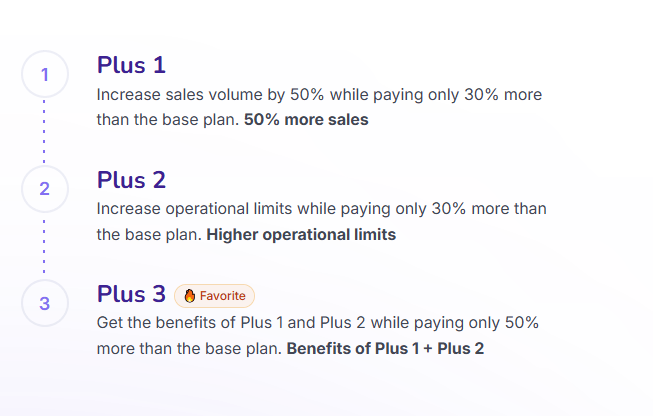
(1) Changing your plan with the “Plus” category works the same way as in the monthly plan.
-
Upgrade to a higher plan:
-
this option is for those seeking a significant jump in features and credits. By upgrading to a more advanced plan, such as the Enterprise Annual Plan, you will gain access to a substantially larger amount of credits and often exclusive features that optimize your operations on Guru even further.
-
To choose the best option, it is important to analyze your usage needs and operational volume.
If you have any questions, contact Support via platform chat.
- If I don't spend the credits, will they roll over to the next month?
No, plan credits are valid only during the current billing cycle and do not accumulate for the next cycle.
- I want to migrate my annual plan to a monthly plan, how do I do it?
If you have an annual plan on Guru and want to migrate to a monthly plan, it is important to understand that the transition is not immediate. You cannot simply "switch" from one to the other in the middle of the annual cycle.
To perform this migration, follow this process:
-
Wait for your annual plan to end: first, you will need to wait for the 12-month cycle of your current annual plan to end;
-
Cancel auto-renewal: before the renewal date, make sure auto-renewal for your annual plan is disabled - this prevents you from being charged for another year - to cancel subscription go to My Account » Subscription » Cancel subscription; and
-
Subscribe to the monthly plan: as soon as your annual plan expires (i.e., after 1 year from purchase), you can then subscribe to a new plan, opting for the monthly option.
This is the way to ensure you complete the paid period of your annual plan and then switch to a monthly plan.
- How can I change my plan (upgrade/downgrade)?
You can change your plan at any time. To do so, simply access Your Account > Subscription > Change Plan. Next, select the new plan that best fits your operation.
Note: upgrading (moving up a plan) takes immediate effect and incurs a prorated charge processed at the time of operation. Downgrading (moving down a plan) is an operation scheduled for the next renewal.
- How can I change (upgrade/downgrade) annual plans?
You can change your plan at any time. If you are on a monthly plan, you can upgrade to an annual plan.
Additionally, you can upgrade from an annual plan to a higher annual plan.
Important: regarding downgrades, it will only be possible between annual plans, meaning it is not possible to downgrade from annual plans to monthly plans.
Note: upgrading (moving up a plan) takes immediate effect and incurs a prorated charge processed at the time of operation. Downgrading (moving down a plan) is an operation scheduled for the next renewal, and in the case of annual plans, it is not possible to downgrade to monthly plans.
To change your plan, simply access Your Account > Subscription > Change Plan, and then select the new plan that best fits your operation.
- The plan I want to downgrade to is not available, what should I do?
Two situations may fit this scenario:
Situation 1 - operational resource usage exceeds the limits of the desired plan
If selecting the new plan displays the message "Could not subscribe to the chosen plan. Please check usage limits", it indicates that the desired plan has operational resource(s) lower than what is currently being used. In this case, you will need to disable features or resources exceeding the desired plan limit and then perform the downgrade.
Situation 2 - the desired plan is not displayed in the plan change options
If the desired plan is not available for selection, contact support via chat or WhatsApp to check the possibility of adding it to the list of downgrade options.
Check operational limits:
-
From current plan: under Your account > Subscription; and
-
For all plans: on this page.
- My subscription payment failed, now what?
If you received a message stating that your payment failed, you may need to change the registered credit card. To do this, simply go to My Account > Subscription > Change Credit Card.
- What happens to my Guru account when the subscription is canceled?
When the subscription is canceled, in practice:
-
Recurring charges (subscription renewals) are not processed;
-
Tracking links stop recording statistics;
-
Integrations with tools are not performed;
-
The account credit balance is updated to 10 units. When the balance reaches zero, Checkout Guru goes offline (it will not open and will not process sales).
Access information on how to manage your Guru plan.
- How does the refund work in case of full plan cancellation?
If you decide to completely cancel your plan (whether monthly or annual), the refund process will work as follows:
-
Full refund within 7 days: you are entitled to a full refund of the amount paid if the cancellation request is made within 7 calendar days from the date of payment/plan agreement - this rule applies to both monthly and annual plans.
To understand all the details and specific refund conditions, please check our Terms of Use.
Upon full plan cancellation, services will be interrupted immediately.
Security
In this section you will find answers to questions related to the security of your Guru account.
- How do I change my password?
Log into your account with your username and password, and in the top right menu, click on My Profile.
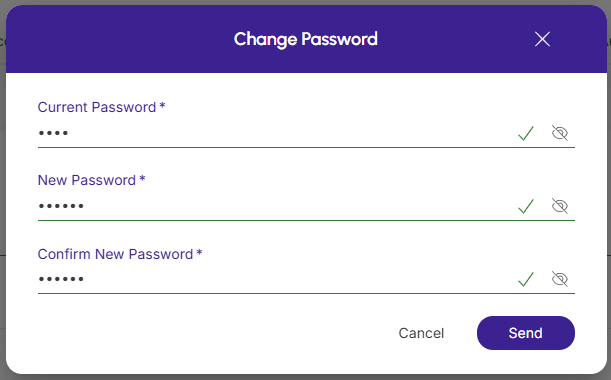
On the Detail tab, click on Change Password.

Enter your current password, then enter the new password and confirm the new password, then click send.
- Do I really have to have 2FA enabled on my account, or can I disable it from my account?
Yes, you must enable 2FA and you cannot disable 2FA from your account, as activation will increase the security and protection of your account. Two-factor authentication (2FA) is mandatory for all Guru users.
In account and users you will be able to access information on how to enable and activate 2FA.
- I'm having trouble logging in, now what?
If you are having trouble logging in, you will need to check with your account administrator to see which login method is active. You can also try another login method by clicking on how to log in to Guru.
Attention. You can have only one of the login options enabled on your account.
- I lost my access to another Guru account, now what?
If you lost your access to the Guru account, it might be because the account administrator provided you with time-limited access to the account, and that time has expired.
You will need to contact the account administrator to get new access.
I lost access to my phone and/or authenticator and need to reset it, what can I do?
If you lost access to your authenticator and cannot enter your account, there are two main alternatives:
-
If there is more than one Admin user on the account, the first step is to ask the other Admin to follow the steps below:
-
Go to Settings » Users » Find in the list the User » Click on the tab Two-Factor Authentication and Click on Reset to reset the authentication, and
-
After the reset, you will be able to access your account again and set up a new 2FA.
-
-
If you are the only Admin on the account, in this case, you will need to contact our support team via Platform Chat, WhatsApp or email - our team will validate that you are the account owner, and after validation, we will perform a manual authentication reset for you.
Access and learn how to set up a new 2FA using the authenticator app.
Users and Roles
In this section you will find answers to questions related to users and roles in your Guru account.
- I gave access to a user and they compromised my operation. Can I remove their access?
Yes, you can remove user access. In the account and users section, access remove user access from the account.
- I gave access to a user with certain roles, but now I need to grant them more permissions. How do I do that?
You can edit the user's role set or create a new set of roles that you can associate with that user.
Access under users and roles, how to manage roles in your Guru account.