
By integrating your Brevo account, you can pass leads captured by Guru, buyer data, and sale information in order to segment your contacts in Brevo, enabling personalized engagement while monitoring conversions and revenue.
To activate the integration, you need to obtain your API key from your Brevo account, then define the rules for contact segmentation and map additional sale or subscription fields.
On this page:
-
Step 1: Obtain API Key
-
Step 2: Activate the integration with Brevo
-
What to do next
Before you begin, you need to:
-
Have a Brevo account.
-
Be an administrator user or have permission to perform the following actions.
Step 1: Obtain API Key
In this step, you will obtain the API key in your Brevo account.
Before generating the API keys, you will need to add or allowlist the IP addresses that will be authorized in your Brevo account. Click here to manage your authorized IP addresses.
If you wish, visit the Brevo Help Center to consult the tutorial on how to add IP addresses.
Steps:
1 - Access your Brevo account with your username and password.
2 - In My Profile, click on SMTP & API.
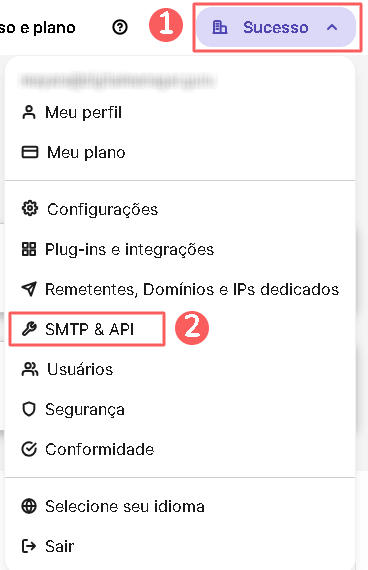
3 - Click on API Keys, and then Generate a new API key.

4 - Enter a name for your API key.
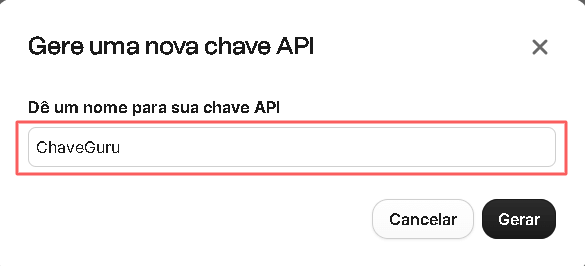
5 - Click on Generate.
6 - Copy and store your API Key.
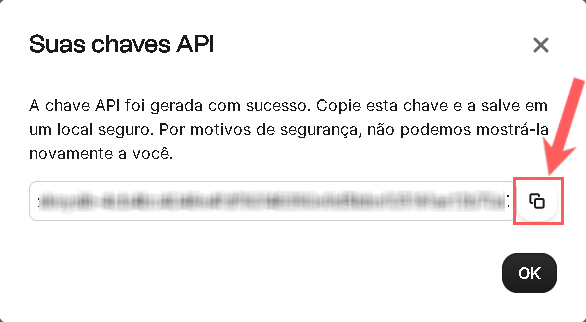
Step 2: Activate Integration with Brevo
In this step, you will enter the API key obtained from Brevo into Guru.
The API key/token will not be available after saving the integration. If you change the API key, it will no longer be valid, requiring you to return to the Brevo environment to obtain the key.
This change will provide greater security for your account, making it impossible to view integration data.
Steps:
1 - Access the Guru admin with your username and password.
2 - In the side menu, access Settings > Integrations > Autoresponders > Brevo.

3 - On the Details tab, enter:
-
API Key: your API key obtained in step 1 - item 6;
-
Active: switch the toggle to the on position.
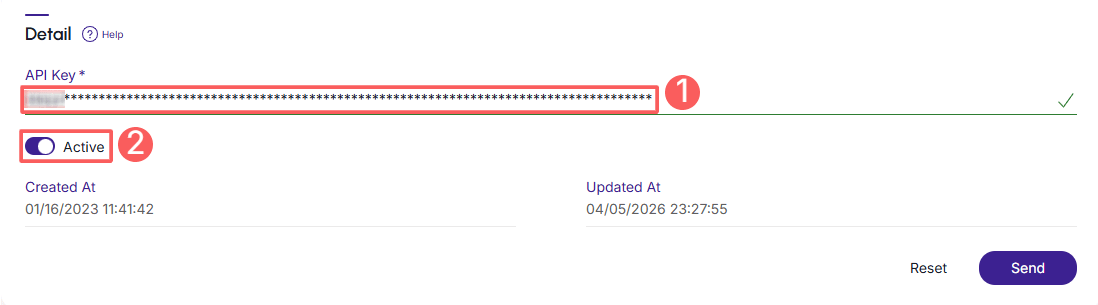
4 - Click on Send.
To confirm that the integration is active, you should see a notification in the upper right corner.
What to do next
Once the integration with Brevo is active, you must set up the rules for contact segmentation in Brevo; and map any additional fields you want (optional step).
This configuration is done through:
1 - Sales Status Mapping for Brevo;
2 - Sending Custom Data to Brevo.