
In the dynamic digital universe, where every second and every detail matter, having the right tools can be the difference between success and stagnation. In this context, having a platform that efficiently centralizes the management capacity of online sales operations is crucial.
It is in this scenario that Guru positions itself as a robust and intuitive solution, offering an arsenal of functionalities designed to simplify and optimize your journey.
The Guru offers tools that help receive online payments, whether for products, services or event tickets; automate the sales process, such as issuing invoices, segmenting contacts in the email marketing list, in addition to monitoring campaign ROI and other business metrics in a matter of seconds.
On this page:
-
Who is Guru for?
-
Main features
-
Plans
-
Free Trial - Guru
Who is Guru for?
The Guru is the ideal solution for companies looking to establish a simple and efficient online sales structure, eliminating the need to maintain development teams or deal with the complexity inherent in a traditional e-commerce platform.
The Guru was born to de-bureaucratize the digital sales process, allowing entrepreneurs to focus on what really matters: the growth of your business.
Guru's versatility makes it a powerful tool for a wide range of business models, including:
-
Content producers; software companies (SaaS); subscription clubs; recurring businesses; course companies; training and consulting; event organizers and producers and ticket sales and physical product stores that use sales pages are examples of businesses that greatly benefit from Guru.
On our platform, the seller can operate their business in an uncomplicated way. With just a few clicks, it is possible to:
-
Receive payments: configure various payment options, such as credit card and bank slip, securely and quickly;
-
Integrate tools: connect Guru to other essential tools for your business, such as email marketing systems, ERPs, and analytics platforms;
-
Create campaign control: monitor the performance of your marketing campaigns, understanding which strategies generate more sales and return on investment (ROI);
-
Monitor metrics: have access in seconds to detailed reports on sales, revenue, best-selling products, conversion rate, and many other metrics crucial for strategic decision-making.
This centralization and ease allow companies from various segments to prosper and scale their online business.
Main features
The Guru offers an efficient and powerful solution to manage an online sales operation from customer acquisition to after-sales. Check out the main features below:
-
Checkout ready to use, integrated with over 30 payment systems and easy to configure. Just a few clicks, customizations, and it's ready to sell!
-
Integrations with over 150 different platforms to automate processes, such as payment systems, member areas to grant access to a course, and perform activities such as segmenting contacts in email marketing platforms, sending an SMS, etc.
-
Digital campaign monitoring across different traffic sources with click, checkout, and valid sales tracking. In addition to importing ad costs for real-time ROI generation.
-
Centralized metrics automatically generated that allow tracking the evolution of sales and subscriptions, customer LTV, and analyzing campaigns.
(*) Requires a processor with split payment support.
Plans
The Guru offers fixed monthly plans, with options for different sales volumes, and the best part: we do not charge a fee on your sales! You have total freedom, as we do not require an exclusivity contract or minimum stay on the platform.
In addition, with Guru you have flexibility, being able to opt for monthly plans and now, we have great news: annual plans with a super discount! You get 12 months of access for the price of 10, paid annually.
Plan Change Rules
With the arrival of annual plans, you have more freedom to decide whether you want to subscribe monthly or annually. However, it is important to pay attention to the rules for upgrade, upsell, and downgrade, which are:
Monthly Plans:
-
Upgrade/Upsell: possibility of upgrade/upsell to annual plans equivalent to monthly ones;
-
Downgrade: the downgrade (plan reduction) is possible, but only for monthly plans.
Annual Plans:
-
Upgrade/Upsell: possibility of upgrade/upsell to annual plans equivalent to monthly ones;
-
Downgrade: the downgrade (plan reduction) is also possible, but only for annual plans.
If you wish to change from an annual plan to a monthly plan, you will need to wait until the end of your annual subscription period and then start a new monthly subscription.
And how do Credits work in annual plans?
With annual plans, credits are available for the entire year. For example, if the monthly Apprentice plan offers 600 credits per month, with the annual Apprentice plan you will have 7,200 credits (600 x 12) to use throughout the 12 months.
Attention: all other operational limits remain the same.
If the number of sales exceeds the limit of the chosen plan, don't worry! You can upgrade to a higher plan or purchase an extension that only increases the number of sales or other operational limits, keeping you in control of your growth.
Consult the monthly and annual plans of Guru.
Guru Free Trial
The Guru is a platform that offers various tools to manage online sales operations, allowing you to manage payments, track campaigns, integrate with other tools, and analyze metrics, enabling you to increase your business's profitability.
The Guru offers a trial period functionality that does not require a credit card, allowing customers to try it before committing to a payment.
To configure the trial period, you will need to:
Steps:
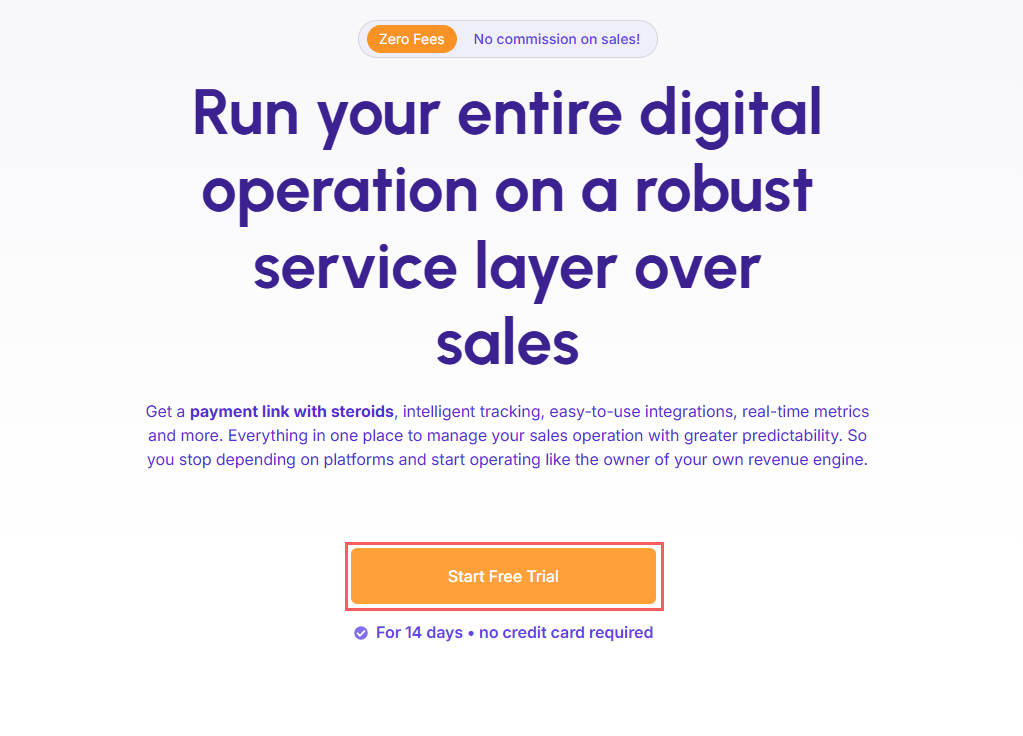
1 - Access the Guru website, and click on Free Trial.
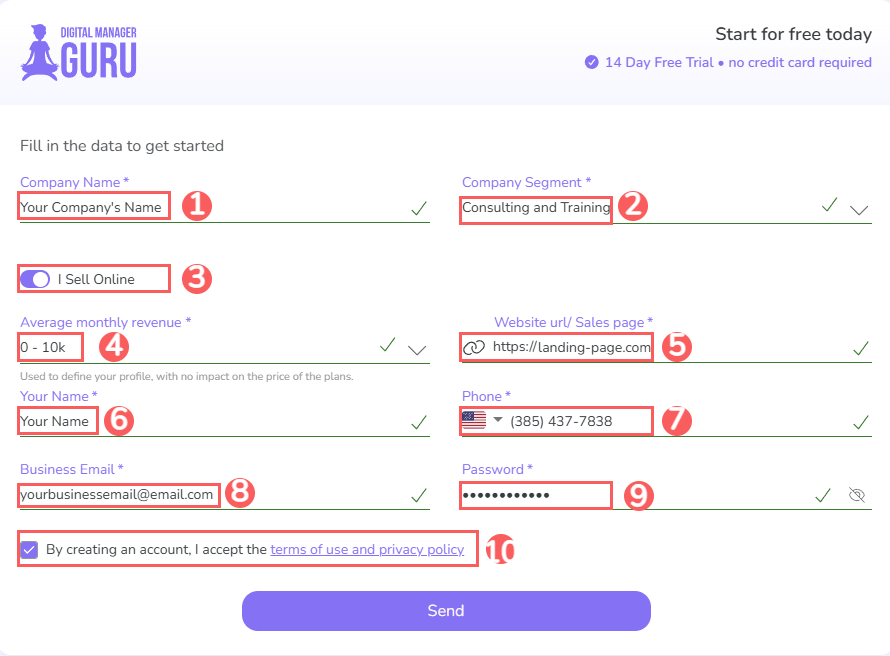
2 - Then, provide:
-
Company name (required): your company's name;
-
Segment (required): your company's area of activity;
-
Selling online? activate this option if you make online sales - if you do not make online sales, leave this option deactivated;
-
Monthly revenue1 (required): select your company's monthly revenue;
-
Website URL/Sales page: your company's website or Instagram - if you do not operate with a website;
-
Your name (required): full name for registration;
-
Mobile2(required): valid contact number;
-
Corporate Email1(required): valid corporate contact email - the email provided will be used to log in to Guru;
-
Password (required): enter the password - the password provided will be used to log in to Guru;
-
I accept the Terms of Use: select so that when creating the account, you accept Guru's terms of use and privacy policy.
(1) The information about monthly revenue is used to define your profile, without impacting the price of the plans.
(2)It is important to enter a valid email and phone contact, as Guru will validate two-factor authentication.
3 - Click on Send.
4 - Next, an email will be sent for account activation.
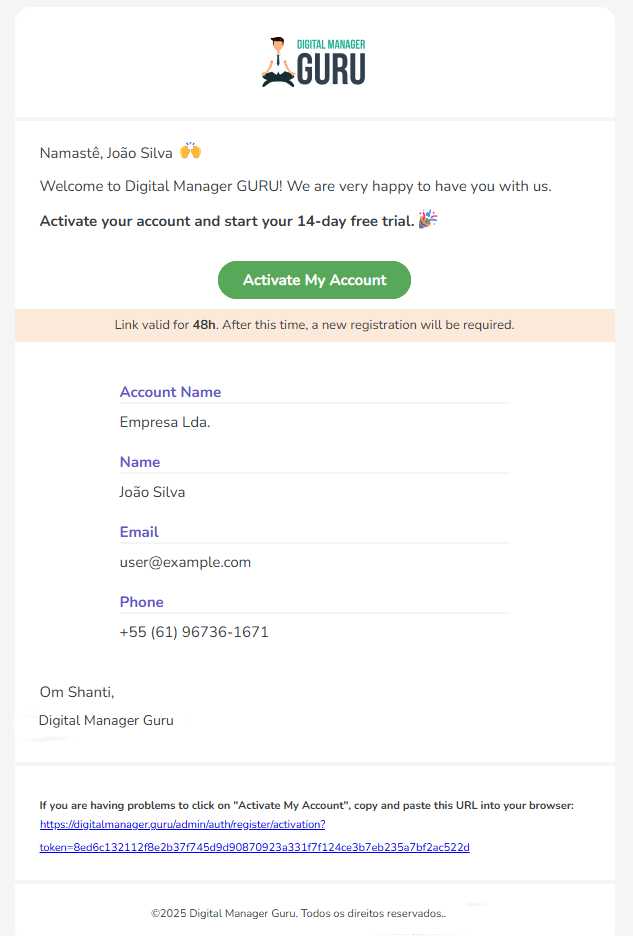
5 - Follow the account activation. instructions.
6 - Then, log in and configure 2-factor authentication.
Done, now you can test Guru.
The standard duration of the trial period is 14 days, from the account creation date. It is important to note that during this period, users will be able to make unlimited sales on the platform. All credits consumed during the trial are returned to the account, meaning that when a sale is registered, the system returns the credit.
In case of launches during the trial period it will be necessary to contact a consultant.
It is important to highlight that during the trial, the user limit is only 1 active user on the platform and each credit consumed during the trial is returned to the account. When the trial period ends, only 10 credits will remain in the account, and once these 10 credits are used up, it will be necessary to subscribe to a plan to continue using the platform. Learn how to subscribe to a plan, if your trial period has ended.
Consult Guru's plans and select the plan that meets your business needs.