
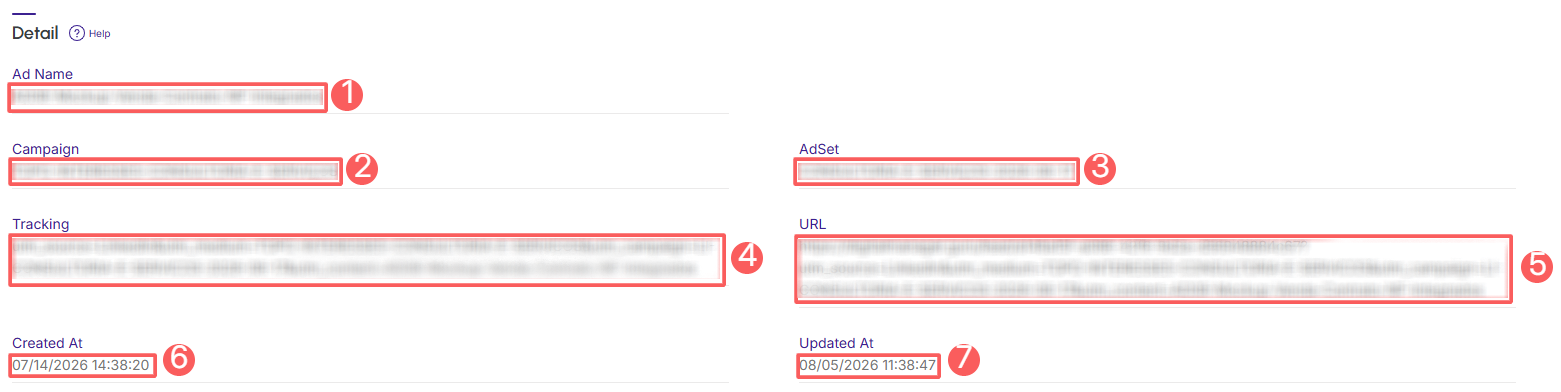
The ad information section displays details such as ad name, campaign, ad set, tracking associated with the ad, and the ad URL.
In addition, you can view daily summary information, such as the date when ad clicks were made, the number of ad clicks, and the total value of clicks.
On this page:
-
Detail
-
Daily Stats
Detail
In the Detail section, you can view ad information. This feature is useful for detailing the ads you want to view.
Steps:
1 - Select the desired ad - a screen with the data will be displayed.
2 - Click on the Detail tab.
3 - The list displays the following information:
-
Ad Name: meta Ads ad name;
-
Campaign: name of the campaign where the ad is inserted;
-
AdSet: ad set;
-
Tracking: name of the tracking associated with the ad;
-
URL: URL associated with the ad;
-
Created At: date and time the ad was created;
-
Updated At: date and time the ad was updated.
Daily Stats
In the Daily Stats section, you can view the daily summary of ads. This feature is useful for detailing daily ad clicks.
Steps:
1 - Select the desired ad - a screen with the data will be displayed.
2 - Click on the Daily Stats tab.
3 - The list displays the following information:
-
Clicks: number of clicks on the ad;
-
Value: total value for the day;
-
Created at: date when ad clicks were made;
-
Updated at: update date when ad clicks were made.
