
Ads registered in Guru are automatically listed in the ad accounts section within the Reddit Ads section.
To find Reddit Ads ad accounts in a list with many records, you can search and filter the list.
On this page:
-
Check the list of ads
-
View data for an ad
-
How to filter the list of ads
Before you begin, you need to…
-
Be an administrator user or have permission to perform the following actions.
-
Have an active integration with Reddit Ads.
Check the list of ads
By default, the list of ad accounts is organized by creation date (from newest to oldest). For faster page loading times, only the first 30 records are displayed. If you wish to view the remaining items on the list, you can scroll to the bottom of the page and click See more in the bottom center of the screen.
Steps:
1 - Access the Guru admin with your username and password.
2 - In the side menu, go to Settings > Integrations > Publishers > Reddit Ads.

3 - Click on the Ads tab.
4 - The list displays the following information:
-
Ad: name of the Reddit Ads ad;
-
Campaign: name of the campaign in which the ad is placed;
-
Adset: ad set;
-
Created At: date and time the ad was created.

View data for an ad
You can view1 all ad information.
(1) Permission is required to perform these actions.
Steps
1 - Access the list of ads - if you wish, you can apply a filter.
2 - Locate the desired ad in the list.
3 - Click on the desired ad.
4 - Check the ad information.

How to filter the list of ads
You can use filters to view a smaller subset of existing ads. This feature is useful for finding specific ads you want to view.
Attention: list searches have a maximum selection limit of up to 100 items per filter.
Steps:
1 - Click on the Ads tab. Then, upon loading the page, a list containing all ads will be displayed.
2 - Under Ads, click Filters.
3 - Fill in one or more filter options:
-
Created At (initial): searches for ads created with date equal to or after (the ad's verified field corresponds to the option selected in Filter by Date);
-
Created At (end): searches for ads created with date equal to or before (the ad's verified field corresponds to the option selected in Filter by Date);
-
Ad Accounts: searches ad accounts- if you want to display all accounts, select all;
-
Ad ID: searches by the ad identification number;
-
Ad Name: searches by the ad name;
-
Campaign ID: searches for the identification number corresponding to the campaign;
-
Campaign Name: searches by the campaign name;
-
Adset ID: searches by the group identification number;
-
Adset Name: searches by the ad set name;
-
Matched: searches for ads that are or are not linked to tracking.
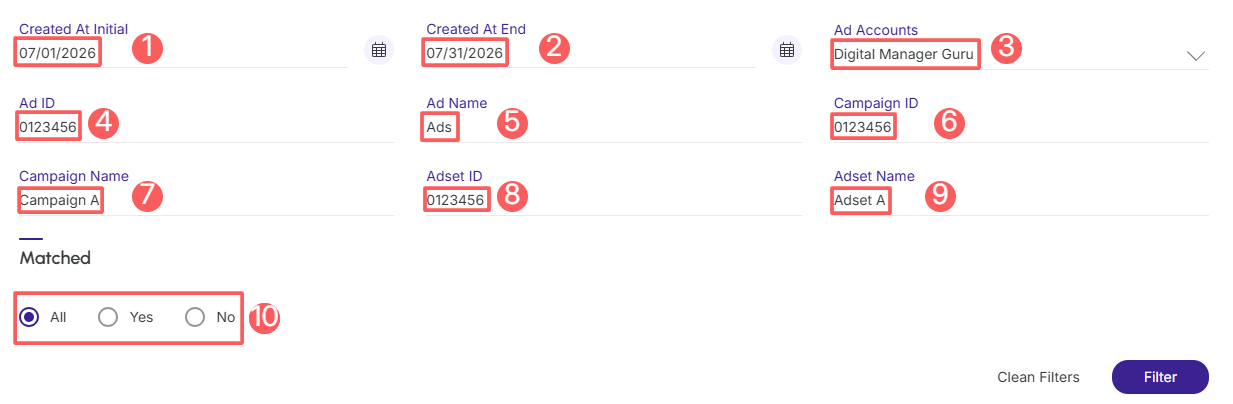
4 - Click Filter.
More Resources