
Companies that make sales based on price quotes and commercial negotiations usually charge a different amount from each customer. When payment is to be made online, it is necessary to create a checkout link for each commercial proposal.
At Guru, it is possible to create dynamic offers to automatically generate a checkout link with the respective value of the commercial proposal.
This feature is useful to streamline the work of the salesperson who, in this case, will not need to manually generate a payment link for each customer.
How it works
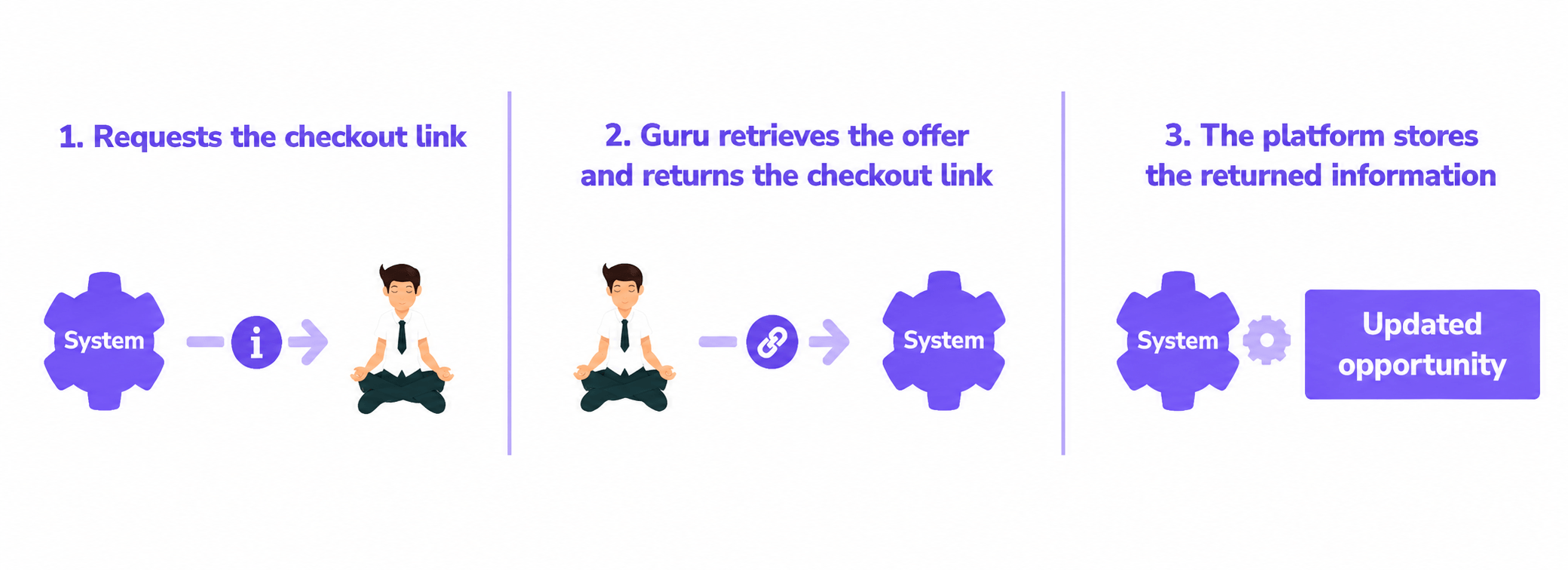
1 - The CRM system or sales pipeline sends a checkout link generation request to your Guru account, indicating the product, the base offer, and the amount to be charged;
2 - Guru locates the offer of reference, generates a checkout link, and returns it to the originating system. If the offer is configured for dynamic values, the amount to be charged at checkout corresponds to the value informed in the request. Otherwise, the amount to be charged will be the value configured in the base offer.
3 - The originating system follows the internal opportunity management flow.
Prerequisites for a checkout with dynamic values
To use Checkout Guru with dynamic values, you must meet one of the prerequisites below:
-
Use a CRM or sales pipeline integrated with Guru that supports dynamic offer checkout links.
-
Integrate your CRM or proprietary system with the Guru API and use the dynamic offer function.