
UTM parameters are a powerful tool used in digital marketing. UTMs are used to track the effectiveness of online sales campaigns across different traffic sources and/or publication media, whether paid or not.
In Guru, you can access information about UTMs in the sales detail and/or in the conversion funnel of the trackings.
On this page:
-
What are UTM parameters
-
How the UTM parameter works in Guru
-
Using the UTM parameter in trackings
-
What are the benefits of using UTM in R.P.P.C. links?
-
How to plan the use of UTM parameters
-
Best practices for using UTM parameters
-
-
UTM Consultation
What are UTM parameters
UTM parameters are text strings, where free fields can be created and extensions added after links, to understand the origin of traffic. Through UTMs, it is possible to know where it was published, the campaign linked to a certain link, and understand user actions and behavior.
Each UTM parameter allows identification for each function in your business, these being:
-
utm_campaign: it is possible to identify campaigns that generated more traffic, by grouping different sources, media, and content; -
utm_source: it is possible to determine the traffic source, that is, where the user came from and which medium they were impacted by the link, which could be via Google, Instagram, Facebook, e-mail, among others; -
utm_medium: it is possible to understand the origin of the traffic, and/or the location where that link was shared; -
utm_content: it is possible to create similar content, using different UTMs. This parameter will help to understand what type of content/ad worked; -
utm_term: it is possible to use different terms for different ads, and through it, understand which ad term was displayed and converted the lead, for example.
In this way, it is possible to build different strategies and use UTM parameters for your company, to engage, measure, and monitor your campaigns.
In tracking links (R.P.P.C), Guru ignores the value informed in the field utm_source, as this value corresponds to the field Origem in the tracking edit.
How the UTM parameter works in Guru
In Guru, the use of the UTM parameter serves to visualize campaign results in a segmented way, that is, grouped for each existing UTM combination.
The configuration and visualization of results vary according to how the UTM was informed.
Scenario 1: UTM in the Guru Checkout Link (without using R.P.P.C)
In this scenario, UTM parameters are sent directly in the Guru Checkout link and recorded in the sale. UTM parameters can be viewed in:
-
Sale Detail; and
-
Sales export spreadsheet
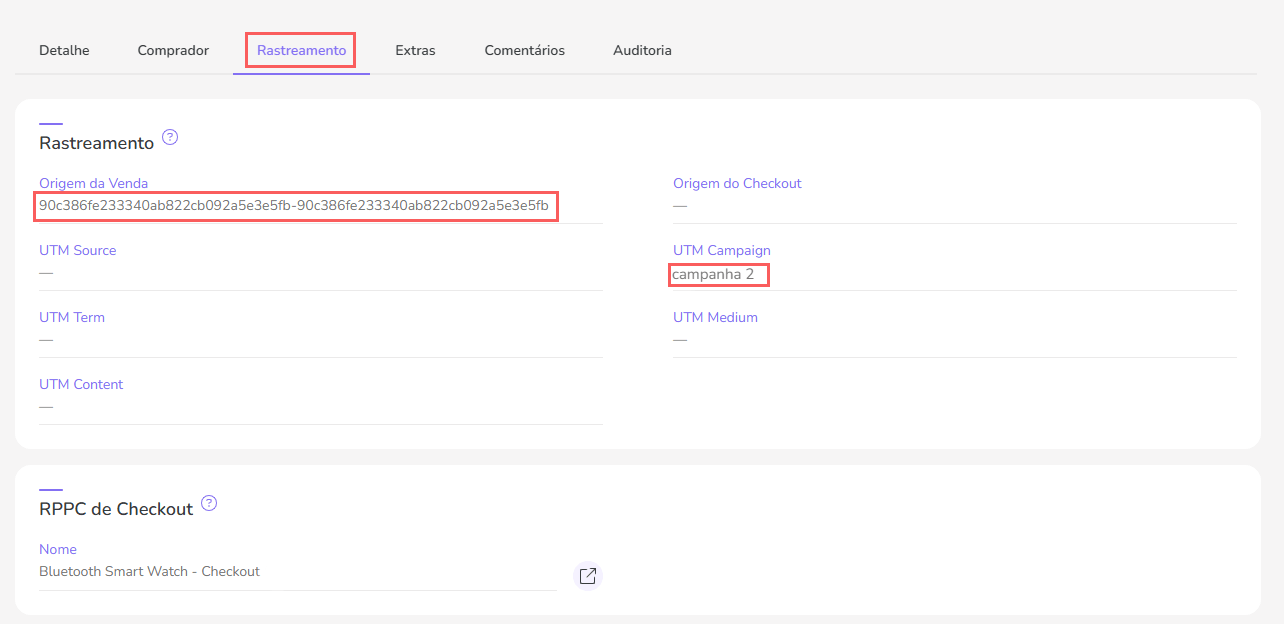
Although UTM parameters are recorded in the sale, there is no graphical visualization of the results, as in this scenario there is no use of the tracking feature.
Scenario 2: UTM in the Tracking Link (Recommended)
Recommended
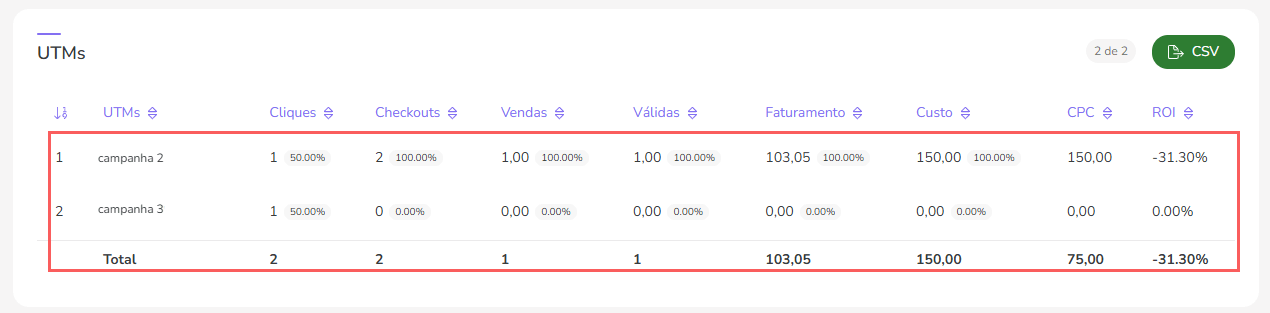
In this scenario, the combinations of UTM parameters are recorded and associated with the main tracking(1) allowing a unified or fragmented view of results by UTM.
UTM parameters can be viewed in:
-
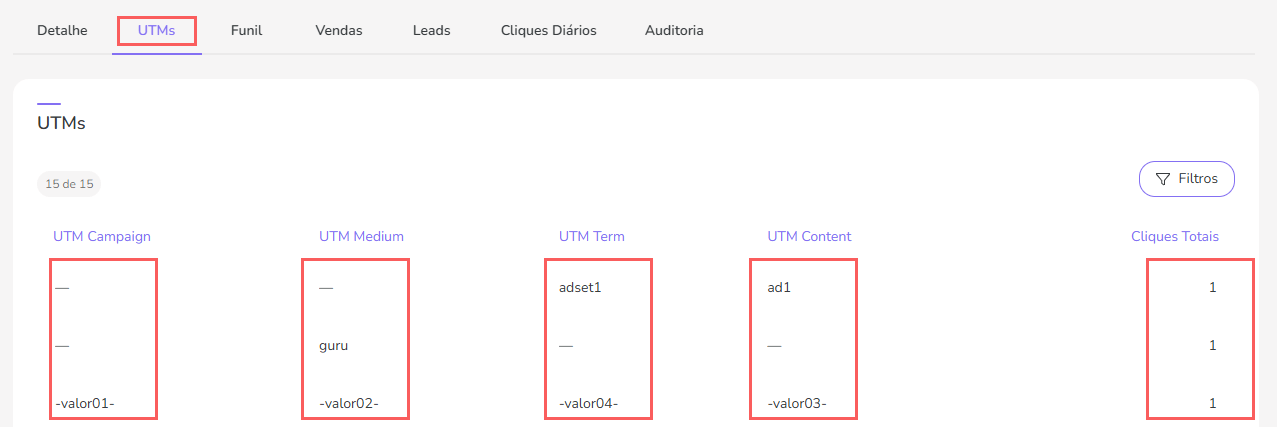
Lead or Sale Tracking Detail (UTM and Funnel tabs)
-
Sale Detail; and
-
Sales export spreadsheet
Click on the available sections to view the aspect of UTMs
Funnel - UTMs section
UTMs
When informing UTM parameters in tracking links, Do NOT inform UTM in the Guru Checkout link, as these will be ignored.
(1) LEAD RPPC or Sales RPPC
Using the UTM parameter in trackings
By using UTM parameters in trackings, it is possible to have a graphical visualization of campaign results and also monitor ROI globally or fragmented.
What are the benefits of using UTM in R.P.P.C. links?
The benefits of using UTMs in tracking links (R.P.P.C) is the possibility of fragmenting the results of the same link while maintaining a unified view.
Thus, when consulting the tracking detail, it is possible to view:
-
Conversion Funnel and Graphs (unified view, fragmented by UTM or filtered by specific UTM);
-
Click table by UTM combination.
How to plan the use of the UTM parameter
it is possible to create UTM combinations using utm_campaign, utm_content, utm_medium and utm_term to group tracking results. For each new UTM combination, Guru automatically generates a “child tracking” and accounts for conversions for it.
The UTM combination can be used to group results by:
-
Ad accounts, ad sets, and creatives on the ad platform (Facebook, Taboola, and others); or
-
Email marketing sequence message (Ex: Email 1, Email 2, Email3 and so on);
-
Articles, banners, or ebooks; or
-
Sales made by each salesperson in the company.
In short, planning the use of UTM is very specific and depends on the needs of each business and the level of detail of the information you want to access. Below we present some examples of how to do this planning.
Example 1 - Online Campaign
Let's say you need a tracking link to use in your Facebookcampaigns, but would like to view the results separated by campaign and ad set.
In this case, you can publish the same tracking link in several Facebook campaigns, changing only the UTM values to differentiate the campaign and/or ad set as follows:
-
Destination URL (Tracking Link):
https://clkdmg.site/campaign/xyz -
UTMs
-
In Campaign 1, Set X:
utm_campaign=FB|Campanha-01&utm_content=Conjunto-X -
In Campaign 2, Set Y:
utm_campaign=FB|Campanha-02&utm_content=Conjunto-Y
-
To learn how to correctly publish the tracking link and UTMs on the ad platform, consult How to Publish Tracked URL in Traffic Sources.
Example 2 - Sales team members
Let's say you need to know how many sales were closed by the sales team, but also want to know how many sales each salesperson made individually.
In this case, the tracking link to which the customer will be directed can be the same, and only the UTM values can be changed for each salesperson. Thus:
-
Destination URL (Tracking Link):
https://clkdmg.site/campaign/zgd -
UTMs (salesperson identification)
-
João Silva:
utm_campaign=Time-Vendas|Joao-Silva -
Maria Peixoto:
utm_campaign=Time-Vendas|Maria-Peixoto
-
-
Link to distribute to each salesperson:
-
João Silva:
https://clkdmg.site/campaign/zgd?utm_campaign=Time-Vendas|Joao-Silva -
Maria Peixoto:
https://clkdmg.site/campaign/zgd?utm_campaign=Time-Vendas|Maria-Peixoto
-
Tip: to generate links with UTM, we recommend the Campaign URL Builder tool provided free of charge by Google.
Best practices for using UTM parameters
When using UTMs in Guru, it is necessary to pay attention to the use of certain characters so that the parameter values are not broken, become illegible, or new UTM combinations are generated.
To avoid the above problems, we recommend generating the UTM value following these practices:
-
Do not use special characters, spaces, or parentheses - when using these, the link or parameter value will be broken;
-
Set up a standardized structure of values for UTMs - Ex:
FB|Campanha-AorEmailMkt|Campanha-02 -
Determine which fields to use for each traffic source - you can choose to always use all UTM fields (or not) or make intermittent use of UTMs between traffic sources to leverage previous values from another traffic source the visitor may have passed through;
-
Do not use dynamic advertiser variables - preferably set the parameter values manually, because if the campaign/set/ad has spaces, accents, or any special characters, these will be broken in the link, making it difficult to correlate campaign costs with each UTM combination.

-
Create a standardized structure that helps you identify the creative, as in the example below:
By using Guru's UTM best practices, it will be possible to understand the origin of traffic in your campaigns, as well as monitor ROI in a unified and segmented way, which will help you use your efforts and resources effectively.
UTM Consultation
You can consult the UTM parameters through the respective sale in the tracking tab.
Consult:
UTM Consultation in Tracking Link