
If necessary, you can force the sending of the subscription to the integrated tools and webhooks active. This feature is useful when a tool has not received the subscription data or it needs to be reprocessed.
Subscription data is automatically sent to previously integrated tools as long as the sending conditions are met.
On this page:
-
Resend subscription data
Before you start, you need…
-
Be an administrator user or have permission to perform the following actions.
-
Have one or more registered subscriptions.
Resend subscription data
You can resend the data for an active or processed subscription in the system at any time. This option is useful for forwarding subscription details, ensuring notifications are properly updated.
Steps:
1 - Access the desired subscription - a screen with the data will be displayed.
2 - In the Detail section, click on Resend.
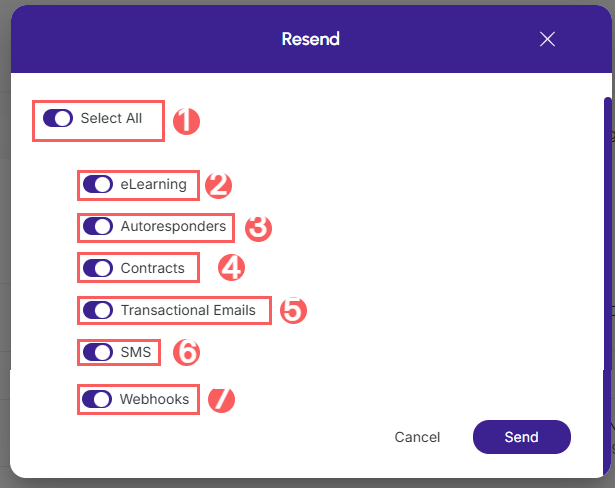
3 - In the displayed window, activate the desired options:
-
Select All: when active, resends* the subscription to all active tools in the listed categories;
-
members Area: when active, resends* the subscription to the integrated members area platform(s);
-
Autoresponders: when active, resends* the subscription to the integrated autoresponder platform(s);
-
Contracts: when active, resends* the subscription to the integrated contracts platform(s);
-
Transactional emails: when active, resends* the subscription to the integrated transactional email platform(s);
-
SMS: when active, resends the subscription to the integrated SMS platform(s);
-
Webhooks: when active, resends* the subscription to the associated webhook(s).
.jpg?cb=8837a4ea6a4e7db37d2e094edac9e7bf)
4 - Click on Send.