You can access the performance metrics of a Neural Sales A/B Test by viewing all transaction information in the section Sales. In Leads, you can track captured customers and the capture date; in Daily Clicks, you have access to a daily engagement overview, essential for tracking your campaigns.
On this page:
-
Sales
-
Leads
-
Daily Clicks
Sales
In the Sales section, you can view all information about the Neural Sales A/B Test, such as sales code, customer contact, product name, among other details.
Steps:
1 - Select the Neural Sales A/B Test list - a data screen will be displayed.
2 - In Sales, the list displays the following information:
-
Status: label of the current sales status - one of the possible sales statuses;
-
Code: sales identification number - hover over the code to consult the associated payment processor;
-
Contact: customer name (buyer);
-
Product: name of the product linked to the order (sale);
-
Ordered At: date of sale;
-
Value: sales value charged to the buyer;
-
Payment Method: icon indicating the payment method registered for charges - hover over the icon to view the label.

Leads
In the Leads section, you can view lead information such as email and lead creation date. This feature is useful for finding leads captured in the A/B test.
Steps:
1 - Select the Neural Sales A/B Test list - a data screen will be displayed.
2 - In Leads, the list displays the following information:
-
Email: email of the lead found in the Sales A/B test;
-
Created At: date when the lead was created.

Daily Clicks
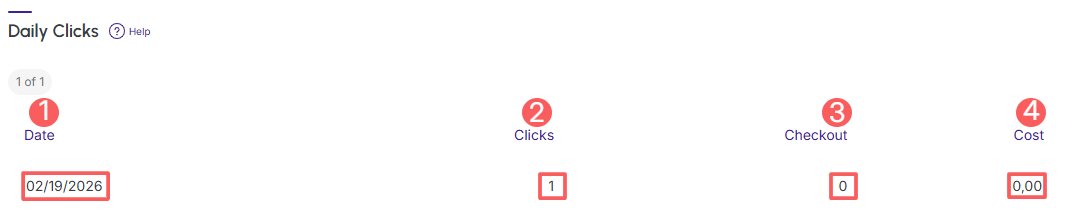
In the section Daily Clicks, you can view the daily summary of tracking. This feature is useful for detailing the daily clicks of the A/B test.
Steps:
1 - Select the Neural Sales A/B Test list - a data screen will be displayed.
2 - In Daily Clicks, the list displays the following information:
-
Date: displays the number of tracked clicks from the sales A/B test;
-
Clicks: displays the number of clicks from the sales A/B test;
-
Checkout: displays the number of clicks from the sales A/B test that passed through checkouts;
-
Cost: displays the total costs of the sales A/B test.