
You can locate a Neural A/B Test for Leads, automatically registered in Guru in the section Neural A/B Test.
To find a Neural A/B Test for Leads in a list with many records, you can search and filter the list.
On this page:
-
Consult list of Neural A/B Tests for Leads
-
View data of Neural A/B Tests for Leads
-
Filter list of Neural A/B Tests for Leads
-
Manage Neural A/B Test for Leads filters
-
-
Show hidden Neural A/B Tests for Leads
Consult list of Neural A/B Tests for Leads
By default, the Neural A/B Test list is displayed in alphabetical order (A to Z), by product name. For faster page loading, only the first 30 records are displayed. If you want to view the other items in the list, you can scroll to the end of the page and click on View more at the bottom center of the screen.
The list displays the following information:
-
Name: name that identifies the Neural A/B Test for Leads;
-
Source: traffic origin of the Neural A/B Test for Leads;
-
Window: duration window of the A/B Test;
-
Active%: current learning percentage of the Neural A/B Test for Leads;
-
Min.%: minimum learning percentage of the Neural A/B Test for Leads;
-
Active Links: number of active links for that Neural A/B Test for Leads;
-
Inactive Links: number of inactive links for that Neural A/B Test for Leads;
-
URL: search by the URL of the Neural A/B Test for Leads;
-
Duplicate: creates a copy of the selected Neural A/B Test for Leads with a new name and disclosure URL;
-
Deactivate: when active, the disclosure URL will no longer be available - there will be no more redirection to the payment URL informed in the button.

View data of Neural A/B Tests for Leads
You can view1 all neural A/B Test for Leads information or update1 the Neural A/B Test data.
(1) Permission is required to perform these actions.
Steps:
1 - Access the Neural A/B Test for Leads list - if desired, you can apply a filter.
2 - Locate the desired Neural A/B Test for Leads in the list.
3 - Click on the desired Neural A/B Test for Leads.
4 - Consult the neural A/B Test for Leads information.

Filter list of Neural A/B Tests for Leads
You can use the filters to view a smaller subset of existing A/B Tests. This feature is useful for finding specific A/B Tests you want to view.
By default, only records from the last 28 days will be shown.
Steps:
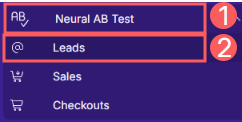
1 - In the side menu, access Neural A/B Test and then click on Leads. After the page loads, a list with all Neural A/B Tests for Leads will be displayed.
2 - In Neural A/B Test for Leads, click on Filters.
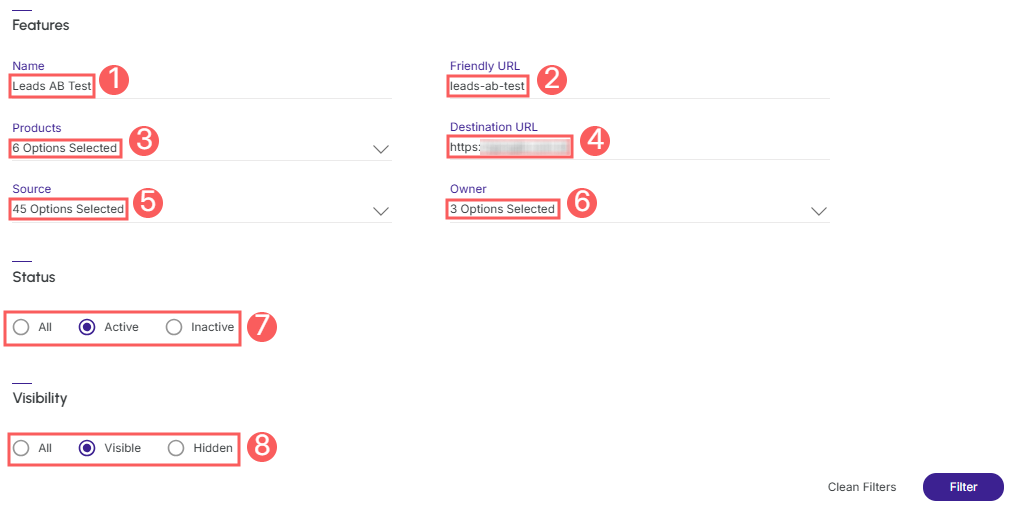
3 - Fill in one or more filter options:
-
Name: searches for A/B Tests that have the informed name or parts of the name;
-
Friendly URL: searches by the URL of the Neural A/B Test for Leads;
-
Products: searches for the product that identifies the Neural A/B Test for Leads;
-
Destination URL: searches by the destination URL of the Neural A/B Test for Leads;
-
Source: searches by the traffic origin location of the Neural A/B Test for Leads;
-
Owner: searches by the owner of the Neural A/B Test for Leads;
-
Status: displays A/B Tests that have the status corresponding to the selected value (Active or Inactive) - if you want to ignore this filter, select the "All" option;
-
Visibility: displays only Sales A/B Tests that are visible or hidden in the Neural A/B Test for Leads list - if you want to ignore this filter, select the "All" option.
4 - Click on Filter.
To remove the applied filters, just click on Clear Filters.
Manage Neural A/B Test for Leads filters
You can check the number of applied filters when using filters to view desired information. This feature is useful if you want to check how many filters have been applied.
In addition, it is possible to clear the filters without accessing the Filters icon again, facilitating the removal of applied filters.
Consult applied filters
You can consult the number of applied filters.
Steps:
1 - In the side menu, access Neural A/B Test and then click on Leads. After the page loads, a list with all Neural A/B Tests for Leads will be displayed.
2 - In Neural A/B Leads Test, click on Filters.
3 - Fill in one or more filter options - apply the filters you want to consult.
4 – Then, the number of applied filters will appear on the screen.

If you want to apply other filters, click How to filter the Neural A/B Test for Leads list.
Clear applied filters
You can remove the applied filters without needing to click on the filters icon.
Steps:
1 - In the side menu, access Neural A/B Test and then click on Leads. After the page loads, a list with all Neural A/B Tests for Leads will be displayed.
2 - In Neural A/B Leads Test, click on Filters.
3 - Fill in one or more filter options - apply the filters you want to consult.
4 – Then, the number of applied filters will appear on the screen.

If you want to apply other filters, click How to filter the Neural A/B Test for Leads list.
Show hidden Neural A/B Test for Leads
You can use the filters to view hidden A/B tests. This feature is useful for displaying Neural A/B Tests that are no longer marketed and cannot be deleted because they have the first click.
To filter the Neural A/B Test for Leads list:
Steps:
1 - In the side menu, access Neural A/B Test and then click on Leads. After the page loads, a list with all Neural A/B Tests for Leads will be displayed.
2 - In Neural A/B Leads Test, click on Filters.
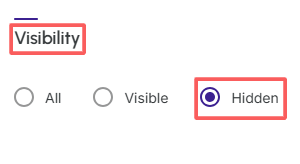
3 - Select in the option Visibility the filter Hidden:
-
Visibility: displays only A/B Tests that are visible or hidden in the Neural A/B Test list - if you want to ignore this filter, select the "All" option.
4 - Click on Filter.