
Users registered in Guru are automatically listed in the Users.section.
To find users in a list with many records, you can search and filter the list.
To create and manage your users through Guru, see create and update users.
On this page:
-
Consult the user list
-
View a user's data
-
How to filter the user list
Before you begin, you need…
-
Be an administrator user or have permission to perform the following actions.
-
Have one or more users managed by Guru.
Consult the user list
By default, the user list is organized by update date (newest to oldest). For faster page loading, only the first 30 records are displayed. If you want to view the other items on the list, you can scroll to the bottom of the page and click on See more at the bottom center of the screen.
The list displays the following information:
-
Name: user's name;
-
Email: user's email;
-
Roles: user's roles;
-
2FA: icon of the two-factor authentication location - via app or email.

View a user's data
You can view1 all user information or update 1a user's data.
(1) you must have permission to perform these actions.
Steps:
1 - Access the user list - if you wish you can apply a filter.
2 - Locate the desired user in the list.
3 - Click on the desired user.
4 - Consult the user information.

How to filter the user list
You can use filters to view a smaller subset of existing users. This feature is useful for finding specific users you want to view.
By default, only records from the last 28 days will be shown, but the period can be changed in the filters, in the Period field.
Steps:
1 - In the side menu, go to Users. After the page loads, a list of all users will be displayed.
2 - In Users, click on Filters.
3 - Fill in one or more filter options:
-
Name: search by user name;
-
Email: search by user email;
-
Administrator: searches for users who have the Administrator role corresponding to the selected user (yes or no) - if you want to ignore this filter, select the “All” option.
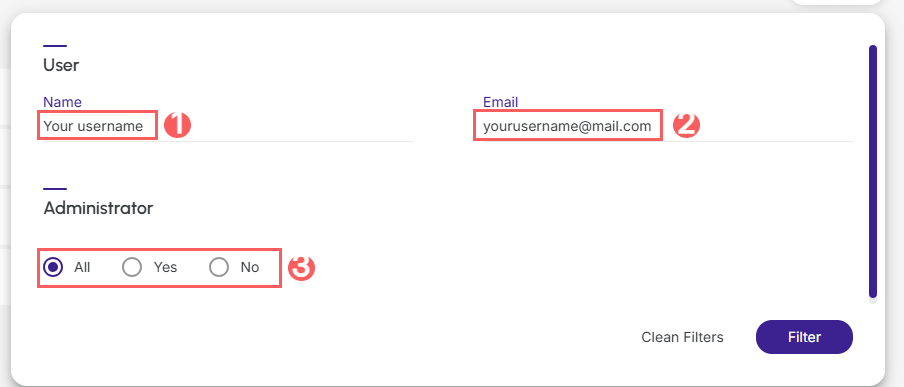
4 - Click on Filter.
To remove the applied filters, simply click on Clear Filters.
More Resources