
At Guru, it is possible to configure the blocklist of unwanted buyers. You can add a list to block malicious buyers who are trying to make a purchase at checkout.
To use this feature, you will need to access the settings in the Guru admin. In the Block List section, you can include blocks by means of the buyer's document number, email, and IP.
On this page:
-
Add a Block List
Before you start, you need to…
-
Be an administrator user or have permission to perform the following actions.
Add a Block List
You can add a block list for malicious buyers by configuring the block by document, email, or IP.
Steps:
1 - Access the guru admin with your username and password.
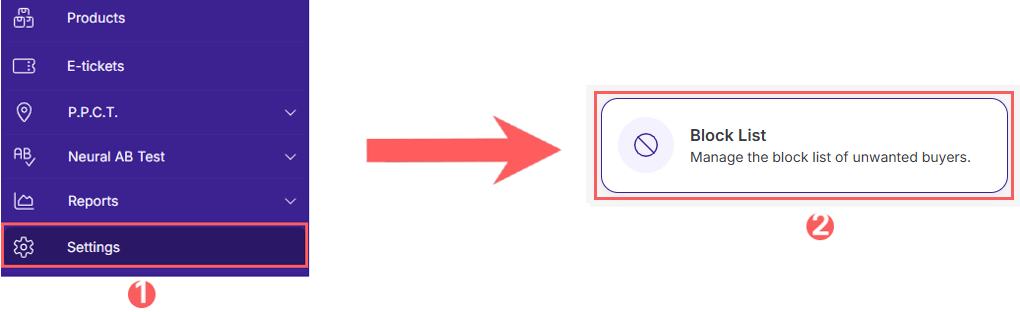
2 - In the side menu, click on Settings and then Block List.
3 - Click on Add Block.
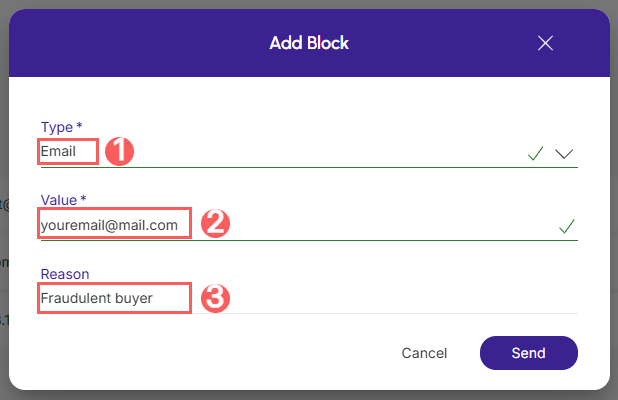
4 - Enter:
-
Type: the type of block you want to add - available the block by document, email, or IP;
-
Value: the value for the type of block - Example, for document block, enter the document number you want to add to the blocklist;
-
Reason: the reason why you want to add it to the block list.
5 - Click on Send.
More Resources